
Sun Clock Widget
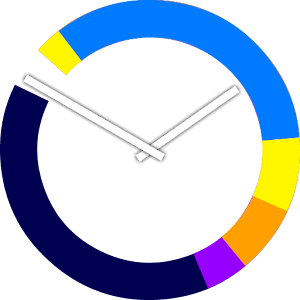
Not only is it a beautiful analog clock, its colored segments show the periods of low sun around sunrise and sunset, including `golden hour', and the periods where the sun is under the horizon but its light is visible (`blue hour').
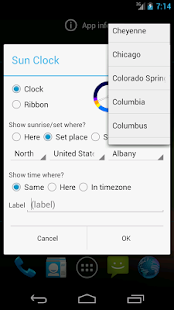
Essential information for photographers and for any outdoor activity from hiking to sailing, and it is now available in a handy widget right on your home screen.You can choose to show sunrise and sunset at your place, or choose from a built-in database with thousands of cities all over the world.
You can also specify the latitude and longitude of a place directly.
SunClock is also a powerful world clock.
It can of course show the time at your place, but also the time in the city you selected, or in any other time zone.
Perfect if you want to keep in touch with remote business partners or loved ones, and knowing if it is night, day, or dusk at their place is a powerful extra.
How do you install a widget?
That depends on your phone or tablet.
Typically you long-touch the home screen and follow the instructions, or there is a special section for widgets in your list of applications.
Search for 'Sun Clock'.
When you install the widget, you will be asked for its settings.
You can always change them later by simply tapping the widget.
See http://www.slowmotioncafe.net/wordpress/en/2013/11/the-sun-clock-widget-for-android/ for more detailed instructions.
The cities database is derived from material at geonames.org.
We thank them for their very helpful data collection!
Keywords: outdoor, world clock, sunset, golden hour, time zone.
About Sun Clock Widget
- Package name (App ID)
- nl.cvr.columbus.sunclock
- Available on
- Google Play
- Price
- Free
- Version
- v1.1
- Developer
- K-M-T-B.Lab
Looking for the Sun Clock Widget APK?
The safest way to get Sun Clock Widget (nl.cvr.columbus.sunclock) on your Android device is to install it directly from Google Play — you'll always get the latest official version, automatic updates, and no risk of modified or infected APK files from third-party sites.
Camera Features
Advanced camera features with editing capabilities.
Smart Home
Control and monitor your home with smart features.
24/7 Support
Our dedicated support team is always ready to help you.
See Sun Clock Widget in Action

Frequently Asked Questions
Is Sun Clock Widget free?
Yes, Sun Clock Widget is free to download and install on Android through Google Play.
How do I install Sun Clock Widget on Android?
Open Google Play on your Android phone or tablet, search for Sun Clock Widget by K-M-T-B.Lab or tap the Google Play button on this page, then tap Install. The app downloads and installs automatically.
What is nl.cvr.columbus.sunclock?
nl.cvr.columbus.sunclock is the App ID (package name) of Sun Clock Widget on Google Play. Every Android app has a unique package name, and it is the safest way to verify you are installing the official app.
Is Sun Clock Widget safe to download?
Installing Sun Clock Widget from Google Play is the safest option: you get the official version published by K-M-T-B.Lab, verified by Google Play Protect, with automatic updates. Avoid APK files from unofficial third-party sites.
Get Sun Clock Widget Today
Sun Clock Widget for Android — free download on Google Play.
Compatible with Android phones and tablets — available on Google Play.
Ask AI about this app
Get instant answers about features, tips and more from popular AI assistants.